What This Article Covers
In #20, we looked at how developing an AI model requires not only data and specialized personnel, but also various resources such as computing resources like GPUs, servers, networks, power, and cooling.
Among them, the device that appears most frequently when discussing the AI era is the GPU (Graphics Processing Unit).
Large-scale AI models use numerous GPUs during development, and securing GPUs has also become an important issue when building AI infrastructure.
However, as the name suggests, a GPU is a graphics processing unit.
It was not originally developed as a semiconductor for building AI.
How did GPUs, which developed to process game graphics, become a core computing resource for the development of AI?
1. The Development of Game Graphics Drove the Development of GPUs
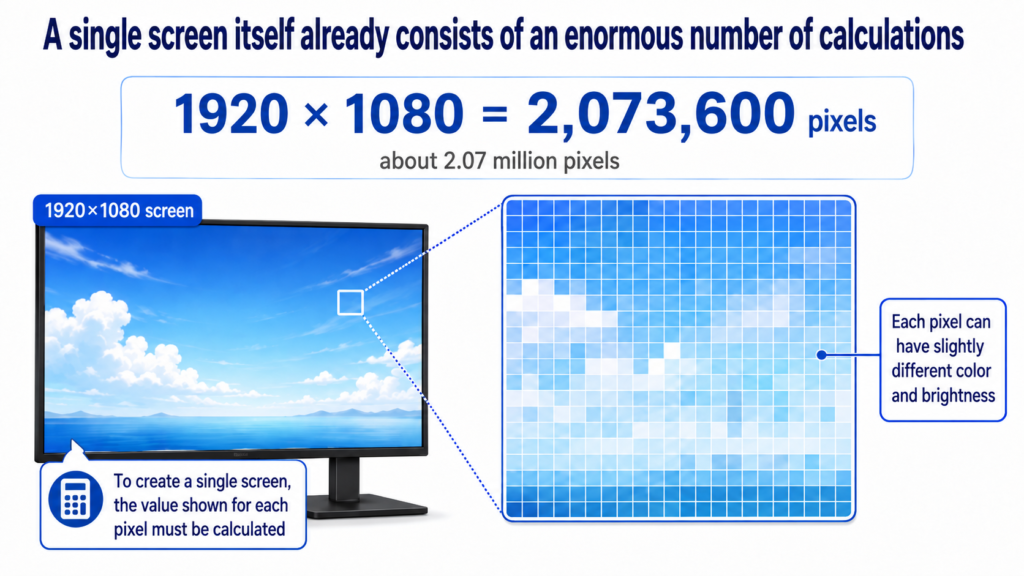
For a computer to display an image on a monitor, it must determine what color and brightness to display for the pixels that make up the screen.
Even a 1920×1080 display consists of 2,073,600 pixels, or about 2.07 million pixels.
Creating a single screen ultimately means determining what to display in each of those roughly 2.07 million pixels.
For example, imagine a blue sky on the screen.
Just because it is the sky does not mean that every pixel is exactly the same shade of blue.
An area receiving more light may be a slightly brighter blue, while another area may be slightly darker. The color and brightness displayed at each position can also vary depending on the position and texture of objects, lighting, and shadows.
Actual graphics processing goes through several stages of calculation involving vertices, triangles, textures, lighting, and other elements.
But if we look at the final result displayed on the screen, it can be understood as a process of calculating what color and brightness should be shown at each position.
In games, this work does not happen just once.
Characters move, the user’s viewpoint changes, and the positions of objects and lighting continue to change.
Each time, the screen has to be recalculated.
What matters here is not simply that multiple screens have to be created.
A single screen already consists of a huge number of calculations, and many of those calculations can be processed at the same time.
Graphics processing is not structured so that one pixel must always be completely calculated before the next pixel can be calculated.
Similar calculations can be distributed across many positions and graphical elements.
Therefore, rather than having a single computing unit process every calculation sequentially at high speed, a structure capable of handling many calculations simultaneously was particularly well suited to graphics workloads.
As game resolutions increased and 3D graphics became more complex, the number of calculations that had to be processed continued to grow.
More objects, more detailed textures, lighting and shadows, higher resolutions, and smoother graphics all had to be calculated within a short period of time.
In response to those demands, GPUs also developed in the direction of processing large-scale parallel computations quickly.
NVIDIA also explains that because game and graphics computations have a high degree of parallelism, GPUs developed into processors capable of performing many calculations simultaneously.
2. Graphics GPUs Began to Be Used for Other Types of Computing
As the parallel processing performance of GPUs increased, attempts began to use that computing capability in areas beyond graphics.
The computing power of GPUs had become too substantial to use only for calculating game graphics.
As a result, GPUs began to be used in fields such as scientific computing, medical imaging, and simulation, where many calculations could be performed simultaneously.
This is called GPGPU (General-Purpose Computing on Graphics Processing Units).
In other words, GPUs created for graphics began to be used for general-purpose computing as well.
Later, development environments such as CUDA made it easier for developers to use the parallel computing capabilities of GPUs in programs beyond graphics.
And there was another field that matched the parallel processing structure of GPUs particularly well.
That field was AI.
3. Applying GPUs to AI Greatly Reduced the Computing Bottleneck
Neural networks existed before GPUs were used for AI.
It was not the case that AI models could not be computed without GPUs.
Neural networks could also be trained and their results checked using CPUs.
The problem was time.
Training an AI model requires repeatedly calculating a very large number of values inside the model.
As the model becomes larger and the amount of training data increases, the amount of computation increases as well.
Researchers do not create a model once and stop there.
They design a model, train it, and check the results.
If the results are unsatisfactory, they change the structure or settings and train it again.
Then they compare the results again.
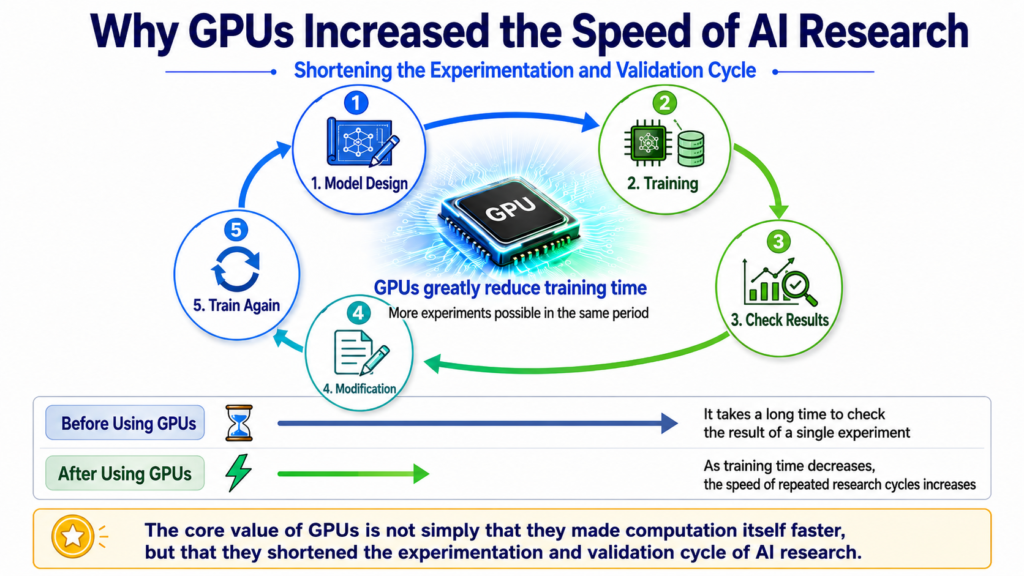
In other words, AI research repeatedly goes through the following process:
Model design → Training → Result evaluation → Modification → Training again
However, if training a model once takes a long time, researchers have to wait a long time to see the result even when they have a new idea.
If each experiment is slow, the overall pace of research also becomes slow.
Applying the parallel computing capabilities of GPUs to neural network training greatly reduced this problem.
In graphics, similar calculations were repeatedly performed across many pixels and graphical elements, while neural networks repeatedly performed similar operations across many values.
Graphics and AI do not perform the same calculations, but they share the characteristic that processing large numbers of calculations in parallel can be advantageous.
Using GPUs significantly reduced AI model training time, allowing researchers to build more models and repeat more experiments within the same period.
The important impact of GPUs on the development of AI was not limited to simply making individual calculations faster.
They accelerated the experimentation and validation cycle of AI research.
4. AlexNet Showed How GPUs Could Change AI Research
A representative example showing the impact of GPUs on AI development is AlexNet, published in 2012.
Convolutional neural networks (CNNs) already existed at the time.
However, applying large neural networks to large-scale, high-resolution image datasets required an enormous amount of computation.
The AlexNet researchers actively used GPU-optimized computations while training a large neural network on approximately 1.2 million training images.
The paper also explains that applying large CNNs to high-resolution images involved very high computational costs, but that the GPUs available at the time and optimized convolution operations made it possible to train a large CNN.
That does not mean training was completed quickly.
AlexNet required about five to six days of training even with two NVIDIA GTX 580 3GB GPUs.
This shows what GPUs meant at the time.
Neural networks could be computed before GPUs were used for AI.
However, as models became larger, the amount of computing time researchers had to endure became too long.
GPUs significantly reduced that time, allowing researchers to repeat the process of training a model, checking the results, modifying it, and experimenting again more quickly.
Reducing computation time in AI research is not simply a matter of convenience.
For example, if it takes a very long time to see the result of a single experiment, the number of ideas that can be tested in a month is also limited.
On the other hand, if training time is significantly reduced, more hypotheses can be tested and more models can be compared within the same period.
Computing speed translates into research speed.
It would not be accurate to say that GPUs alone ended the long period of stagnation in AI.
Several factors worked together, including the growth of data, improvements in neural network training methods and algorithms, and changes in the research environment.
However, GPUs significantly reduced the computational burden of large neural networks and provided an important computing foundation that allowed deep learning research to advance rapidly.
5. What Is the Difference Between a CPU and a GPU?
The fact that GPUs became important for AI does not mean that they are simply better processors than CPUs.
The two are designed to excel at different types of work.
Consider a game.
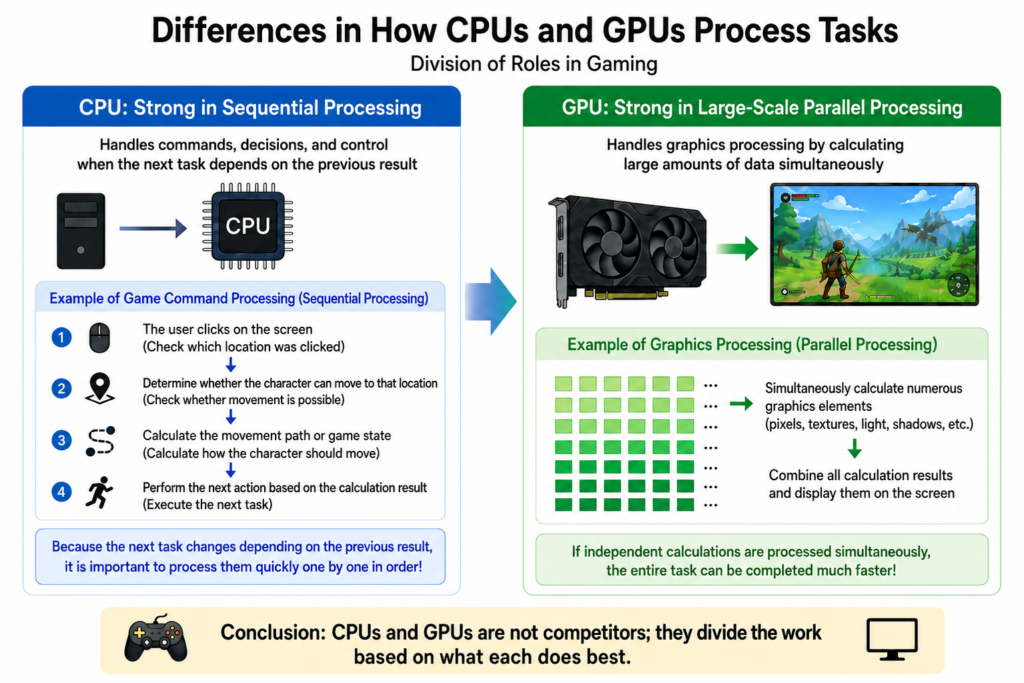
A user clicks on the screen to move a character to a specific location.
The computer first has to:
- Check where the user clicked
- Determine whether the character can move to that location
- Calculate the movement path or game state
- Execute the next task based on the result
For tasks where the next operation changes depending on the result of the previous one and where many different types of instructions must be processed, the CPU plays an important role.
In contrast, once the character’s new position has been determined and the screen needs to be redrawn, many graphical elements have to be calculated at once.
For this type of work, the GPU’s high parallel processing capability is advantageous.
Of course, CPUs can also perform parallel processing, and GPUs do not process every task simultaneously.
The difference lies in what types of workloads each processor is designed to allocate more resources toward.
CPUs are strong at quickly processing individual tasks, handling complex control logic, and executing a wide variety of instructions, while GPUs are strong at rapidly processing large overall workloads by performing many calculations simultaneously.
That is why, in actual computers, CPUs and GPUs often divide the work according to what each does best rather than competing with each other.
6. What Does a GPU Calculate in AI?
AI models contain a very large number of values.
When input data is processed, calculations involving multiplication and addition among these values are repeated.
One important type of computation in this process is Matrix Operation.
There is no need to understand how matrix calculations themselves work here.
You can think of them as repeatedly performing large numbers of multiplication and addition operations on groups of values.
When an AI model is trained, data is entered into the model, calculations are performed, the results are checked, and values inside the model are adjusted.
The same process is then repeated with other data.
As the model and dataset become larger, the number of values and the amount of computation that must be processed also increase.
These types of calculations fit well with the parallel processing structure that GPUs had developed over many years.
The parallel computing capability that had been used to calculate countless graphical elements began to be used in AI to calculate enormous numbers of values.
7. If One GPU Becomes Faster, Can Large-Scale AI Keep Growing?
As AI models became larger, it became difficult for a single GPU to process all the required calculations.
There are limits not only to computing capability but also to the amount of memory available to a GPU.
AlexNet also divided the neural network across two GPUs because the memory of a single GPU at the time was insufficient to handle the model.
As models become larger, multiple GPUs must divide the computations among themselves.
At that point, GPU performance alone can no longer determine overall speed.
Even if several GPUs perform calculations very quickly, the entire training process can still slow down if they cannot receive the necessary data in time or if exchanging results between GPUs takes too long.
That is why large-scale AI requires not only GPUs but also:
- Memory used by the GPUs
- Data transfer between GPUs
- Servers
- High-speed networks
- Power
- Cooling
These are also the reasons why, as discussed in #20, the cost of developing an AI model cannot be calculated based on GPU prices alone.
Even when GPUs are the central computing resource, the surrounding infrastructure must also be configured so that the GPUs can operate properly.
8. Are GPUs Used Only When Training AI Models?
GPUs play an important role in Training AI models.
However, computation continues to be necessary even after a model has been completed.
When a user enters a question or data into an AI service, the already-trained model has to calculate a result based on that input.
This process is called Inference.
Therefore, AI services can use computing resources such as GPUs not only when developing models but also when processing user requests during actual service operation.
However, training and inference differ in the scale and method of computation required, so even for the same AI model, the necessary hardware configuration can vary.
We will take a closer look at how inference works in the beginner section of AI Literacy 30.
9. The Success of GPUs Led to AI-Specific Accelerators
GPUs were not originally designed specifically for AI.
However, applying GPUs to AI made it clear that large-scale parallel computation was highly effective for neural network calculations.
That naturally led to another question.
Instead of using GPUs designed to handle graphics as well, would it be more efficient to design semiconductors from the beginning around the calculations that AI frequently performs?
AI-specific accelerators began to develop in this direction.
A representative example is Google’s TPU (Tensor Processing Unit).
Google developed the TPU as a dedicated ASIC for accelerating neural network computations, and the first-generation TPU was designed to process neural network inference quickly and efficiently.
Later, demand also grew for running AI directly on devices with limited power and space, such as smartphones and PCs, rather than only in data centers.
In these environments, processors such as the NPU (Neural Processing Unit), which are specialized for neural network and machine learning computations, are also used.
This does not mean that TPUs or NPUs were simply copied from GPUs.
What matters is that using GPUs for AI clearly demonstrated the benefits of accelerating AI computations through hardware.
The industry moved one step beyond using the parallel computing capabilities of graphics hardware for AI and toward designing the hardware itself around the types of calculations that AI frequently performs.
Why GPUs Became Essential in the AI Era
As AI developed, the role of GPUs also became larger.
As digital environments expanded, the amount of data being generated and the speed at which it was produced also increased significantly. For companies and services, the ability to process and analyze these large volumes of newly generated data more quickly became increasingly important.
AI also developed toward using more data and processing more complex models, causing the amount of computation required to increase rapidly.
When developing models, large-scale datasets must be trained repeatedly, while actual services must process requests from many users quickly.
As AI moves beyond research models and becomes widely used in real services and business operations, what matters increasingly is not only the performance of a single calculation but also how quickly large numbers of calculations can be processed.
In this environment, the value of GPUs, which can process large-scale computations in parallel, has continued to grow.
As AI models became larger, the performance of a single GPU was no longer sufficient. As architectures that connect multiple GPUs to create large-scale computing environments became more widespread, GPUs moved beyond being graphics components in individual computers and became core computing resources for AI data centers and AI infrastructure.
If the gaming and graphics industries drove the development of GPUs and GPUs then accelerated AI research, AI itself is now creating demand for even greater GPU performance and more computing resources.
A structure has emerged in which the development of GPUs and the development of AI accelerate each other.
DANA NOTES in One Line
GPUs developed into processors with strong large-scale parallel computing capabilities to handle game graphics, and this capability significantly reduced AI training time and increased the speed of research and development, making GPUs a core computing resource of the AI era.