What This Article Covers
AI agents can do more than answer users’ questions. They can also find necessary information or perform actual tasks in external systems.
For example, a user might ask an AI agent:
“Find an available time next week and schedule a meeting.”
To complete this task, the AI must do more than simply generate a sentence.
It must check the user’s calendar, identify an available time, and create a new event. If other participants are involved, it may also need to check their schedules.
However, an AI model itself does not have the ability to communicate directly with Google Calendar, an internal company database, or a file server.
For AI to access information in external systems or perform actual tasks, a separate structure is needed to connect the AI with those systems.
One standard connection method that can be used for this purpose is MCP, or the Model Context Protocol.
What Is MCP?
MCP is an open standard for connecting AI applications to external data and tools.
Through MCP, an AI application can connect to external systems such as:
- Files and documents
- Databases
- Search services
- Email and calendars
- Development platforms such as GitHub
- Collaboration tools such as Slack
- Internal enterprise systems
- APIs provided by external services
MCP does not directly provide the functions of these external systems.
Its role is to provide a common set of connection rules that allows AI to discover and use existing file systems, databases, APIs, and business systems in a consistent way.
Why Can’t AI Connect Directly to External Systems?
An AI model generates an appropriate response based on the information it receives.
However, it does not automatically know what events are on a user’s calendar, what information is stored in an internal company database, or what files exist in a particular folder.
This is because information stored in external systems is not part of the AI model’s internal knowledge.
To use that information, the AI must send a request to the external system and receive the result.
For example, an AI agent would need the following functions to schedule a meeting:
- View calendar events
- Find an available time
- Check participants’ schedules
- Create a new event
- Confirm the created event
These functions could already be implemented before MCP.
A developer could connect a calendar API and write separate code that allows the AI to call functions for viewing or creating events.
The problem is that the structure becomes more complex as the number of systems that need to be connected increases.
Calendars, email services, databases, file servers, and collaboration tools each use different connection methods and authentication procedures. If the AI application changes, similar connection functions may need to be implemented again.
MCP reduces this complexity by standardizing the way different systems are connected to AI.
The Basic MCP Connection Structure
The MCP connection structure can be understood as follows:
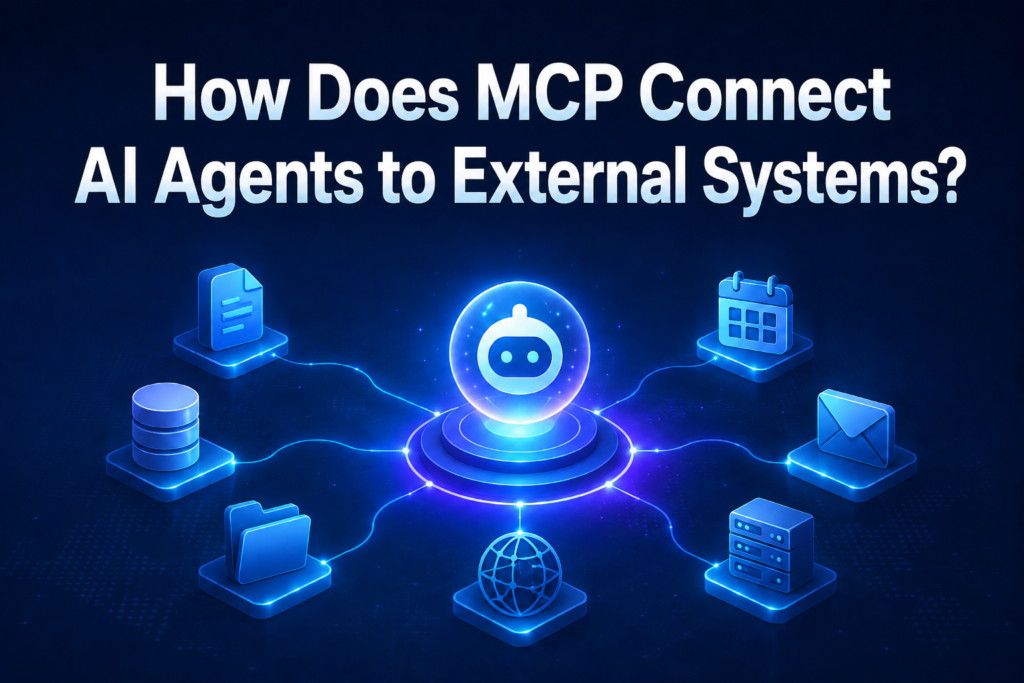
User → AI Application → MCP Client → MCP Server → External System
This structure consists of three core components: the MCP host, MCP client, and MCP server.
In the official MCP architecture, one host manages multiple clients, and each client connects to a specific MCP server.
1. MCP Host
The MCP host is the AI application that the user directly interacts with.
Examples include:
- Conversational AI services
- Development tools with AI capabilities
- Internal enterprise AI systems
- AI agent platforms
- AI programs that support document creation or data analysis
The host receives the user’s request and runs the AI model.
It also manages the overall process, including which MCP servers to connect to, which tools to make available to the AI, and which tasks require user confirmation.
An important point is that the AI model itself and the MCP host are not the same thing.
The AI model is responsible for understanding language and deciding what action should come next.
The MCP host, by contrast, is the complete application that includes the AI model, user interface, conversation history, permission management, and external system connection functions.
2. MCP Client
The MCP client is the component responsible for the connection between the AI application and the MCP server.
The client runs inside the MCP host and communicates with a specific MCP server.
For example, if one AI application is connected to both a calendar and GitHub, the following structure may be created:
- Calendar MCP client → Calendar MCP server
- GitHub MCP client → GitHub MCP server
The MCP client checks which functions the server provides, requests the execution of a function selected by the AI, and then passes the result returned by the server back to the host.
Users generally do not operate the MCP client directly.
In most cases, it manages connections within the AI application.
3. MCP Server
The MCP server is a program or service that provides the data and functions of an external system through MCP.
The word “server” may make people think of a separate large computer or physical piece of equipment.
However, an MCP server does not necessarily refer to a physical server. It may be a small program running on the user’s computer or a remote service operating in a company’s cloud environment.
The MCP server acts as an intermediate connection layer between the AI application and the actual external system.
For example, a calendar MCP server may perform the following roles:
- Tell the AI application which calendar functions are available.
- Check the input values required for the task requested by the AI.
- Send the request in a form the actual calendar system can understand.
- Return the result received from the calendar to the AI application.
- Manage the user’s access permissions and authentication credentials.
Therefore, an MCP server is not the calendar or database itself.
It is closer to an adapter that provides the functions of an external system in a form that AI can understand and use.
What Does an MCP Server Provide from an External System?
An MCP server mainly provides the data and functions of an external system in three forms: tools, resources, and prompts.
1. Tools
Tools are functions that AI uses to perform specific tasks in an external system.
For example, a calendar MCP server may provide tools such as:
- View a list of events
- Find an available time
- Create a new event
- Modify an existing event
- Delete an event
A file management MCP server may provide tools such as:
- Search for a file
- Create a new file
- Rename a file
- Edit document content
- Move a file
Each tool includes a definition of what task it performs, what information it requires, and what result it returns after execution.
For example, an event creation tool may require the following information:
- Event title
- Start time
- End time
- Participants
- Meeting location
The AI reviews these descriptions and selects the tool that best matches the user’s request.
The existence of a tool does not mean that the AI can always execute it freely. The AI application can block the use of certain tools or require user approval before execution.
2. Resources
Resources are information that AI can use to understand a task and make a decision.
Examples include:
- File contents
- Product manuals
- Project documents
- Data stored in a database
- System configuration information
- Data retrieved from an API
- Internal company policies and operating guidelines
If a tool is a function used to perform an action in an external system, a resource is closer to a function that allows AI to read the information needed to make a decision.
Suppose, for example, that AI needs to retrieve sales data from a database.
The AI must first know which table contains the sales information and what each field means. An MCP server can provide the database structure or field descriptions as resources.
The AI application selects the necessary resources and passes them to the AI model. The AI model then uses that information to decide what to do next.
3. Prompts
Prompts are predefined task templates designed to perform a particular type of work in a consistent way.
For example, a meeting management MCP server may provide prompts such as:
- Organize today’s meeting schedule
- Summarize meeting minutes
- Draft follow-up tasks after a meeting
- Review next week’s schedule
- Organize key decisions by participant
Prompts allow users to avoid writing lengthy instructions from the beginning every time.
By selecting a predefined task template and entering only the necessary information, the user can have the AI perform the task according to a consistent procedure and format.
In general, tools can be understood as functions to execute, resources as information to reference, and prompts as templates for carrying out work.
How an AI Agent Uses MCP
Suppose a user asks an AI agent:
“Schedule a one-hour meeting for next Tuesday afternoon.”
This request may be processed through the following steps.
Step 1. Connect to the Calendar MCP Server
The MCP client in the AI application connects to the calendar MCP server.
Once the connection is established, the MCP client and server can exchange requests and results.
Step 2. Check the Available Functions
The MCP client checks the tools provided by the calendar MCP server.
The server may provide functions such as:
- View events
- Find an available time
- Create an event
- Modify an event
- Delete an event
The AI application passes this information to the AI model.
Through this process, the AI model learns what actions it can perform in the calendar.
Step 3. Analyze the User’s Request
The AI model organizes the conditions contained in the user’s request.
- Date: Next Tuesday
- Time period: Afternoon
- Event length: One hour
- Requested action: Create a meeting event
If required information such as the meeting title or participants is missing, the AI may ask the user for additional details.
Step 4. Select the Required Tool
The AI may determine that it needs to check for an available time before creating the meeting.
In this case, it first selects the available-time search tool.
It then prepares information such as the date, time period, and event length as input values.
Step 5. Request the Task from the MCP Server
The MCP client sends the tool selected by the AI and the required information to the calendar MCP server.
At this point, the AI application and MCP server exchange requests and results according to a shared, predefined format.
Just as people using the same application form allow both the person submitting it and the person processing it to interpret the information in the same way, MCP allows different programs to communicate according to a consistent set of rules.
Step 6. Perform the Actual Task in the External System
The calendar MCP server passes the request to the actual calendar system in a form that the system can understand.
The calendar system checks the user’s schedule and finds an available time.
Once the user selects a time, or the AI determines an appropriate time according to predefined criteria, the MCP server may call the event creation function again.
The actual calendar lookup and event creation are not performed directly by the AI model. They are handled by the MCP server and the calendar system.
Step 7. Inform the User of the Result
Once the event has been created, the result from the calendar system is passed through the MCP server and client to the AI application.
The AI then presents the result in a sentence that is easy for the user to understand.
“I scheduled the meeting for next Tuesday from 3:00 p.m. to 4:00 p.m.”
In this way, the AI model determines what task is needed, while the MCP server communicates with the actual external system.
How Are Local and Remote Systems Connected?
An MCP server may run directly on the user’s computer or be accessed remotely over a network.
Local Connection
A local connection is a method in which the AI application and MCP server run on the same computer.
For example, it may be used when AI needs to access files or development projects stored on the user’s computer.
The AI application runs the local MCP server program, and the two programs directly exchange requests and results.
The technical connection method commonly used in this case is stdio.
Remote Connection
A remote connection is a method in which the MCP server runs on another system connected through the internet or an internal enterprise network.
For example, it can be used with:
- Enterprise business systems
- Cloud services
- Remote databases
- Collaboration platforms
- External API services
A remote MCP server can receive connections from multiple AI applications and exchange requests and results over a network.
A representative method used for this purpose is Streamable HTTP.
Non-developers do not need to understand the detailed communication procedures of these two methods.
The key point is that an MCP server can run on the user’s own computer or in another location on a network. MCP currently defines stdio, which is suitable for local connections, and Streamable HTTP, which is suitable for remote connections, as standard transport methods.
What Is the Difference Between MCP and an API?
MCP and APIs are not technologies that replace one another.
An API is an interface that allows other programs to use the data or functions of a particular system.
For example, a calendar API provides functions that allow an external program to view events or create new ones.
However, calendar APIs, email APIs, and collaboration tool APIs may all be designed differently.
Because the required input values, authentication methods, and request formats differ, developers must read the documentation for each system’s API and write the necessary connection code.
MCP standardizes the way these existing system functions are provided to AI applications.
For example, a calendar MCP server may internally use an existing calendar API while providing the AI with information such as:
- Which functions are available
- What task each function performs
- What information must be entered
- What result will be returned after execution
Therefore, MCP is not a technology that eliminates APIs.
It is closer to a technology that adds a common connection layer that AI can understand in front of existing APIs and external systems.
The structure can be simplified as follows:
Traditional Application Connection
Application → Individual API → External System
AI Connection Using MCP
AI Application → MCP Client → MCP Server → Individual API or External System
An API provides the actual functions of a system, while MCP organizes those functions so that AI can discover and use them in a consistent way.
Why Is MCP Important for AI Agents?
1. It Standardizes the Way External Systems Are Connected
Without MCP, each AI application would need to implement separate connections to calendars, file servers, and databases.
If an MCP server provides the functions of an external system in a standardized way, the same server can be used by multiple AI applications that support MCP.
This does not automatically eliminate all connection work, but it can reduce the burden of redesigning the AI connection structure differently for every system.
2. AI Can Discover Which Functions Are Available
An MCP server provides more than just a connection address.
It also explains which tools and resources are available, what each one does, and what input values are required.
Based on this information, the AI can select the function that matches the user’s request.
In other words, the AI application does not need to know every external function in advance. It can check which functions are currently available from the connected MCP server.
3. Multiple Systems Can Be Connected in a Single Workflow
One AI application can connect to multiple MCP servers.
For example, the following workflow can be created:
- Check a meeting request in an email.
- Find an available time in the participants’ calendars.
- Create a new event.
- Share the meeting schedule through a collaboration tool.
- Create meeting preparation materials in a document system.
Although each system is different, the AI application can connect multiple functions into a single workflow through MCP.
This provides an important foundation for AI to evolve from a simple conversational service into an AI agent that performs actual work.
4. Access to External Systems Can Be Controlled
Instead of giving database accounts or API credentials directly to the AI model, the MCP server can be configured to handle authentication and connections to external systems.
Only the functions permitted by the MCP server can also be made available to the AI.
For example, suppose an MCP server is connected to a customer database.
The AI may be given only the function to view customer information, while functions for deleting or modifying customer information remain unavailable.
Even when a function is provided, important tasks can be configured to run only after the user approves them.
However, simply using MCP does not automatically make a system secure.
What Security Issues Can Arise When Using MCP?
An MCP server may read files, query databases, and perform tasks in external systems.
Therefore, if an MCP server has excessive permissions or provides untrustworthy functions, sensitive information may be exposed or unwanted actions may be performed.
The following problems may occur:
- A malicious MCP server may send information to an external destination.An untrustworthy MCP server may read the user’s files or business information and transmit it elsewhere.
- Instructions contained in external documents may distort the AI’s decisions.If a document or webpage read by the AI contains hidden instructions, the AI may select a tool that does not match the user’s intention.
- The server may access more systems than necessary.If an MCP server that only needs to read one file can access every folder on the computer, the potential scope of damage becomes larger.
- Authentication credentials may be stolen.If API keys or login permissions are not properly managed, an attacker may access external systems using the user’s privileges.
- Important actions may be executed without user confirmation.Actions that are difficult to reverse, such as deleting files, sending messages, changing data, or making payments, may be executed incorrectly.
- An MCP server may send requests to unauthorized internal systems.If the network connection is exploited, internal enterprise systems or programs on the user’s computer that are difficult to access directly from outside may become targets of attack.
The official MCP documentation also treats stolen permissions, improper transmission of authentication credentials, compromised local servers, and misuse of network connections as major security risks.
Therefore, the following controls are required in an actual production environment:
- Connect only to trustworthy MCP servers
- Grant only the minimum permissions required
- Separate read permissions from modification permissions
- Restrict the files and network ranges that can be accessed
- Require user confirmation before deletion, transmission, or payment
- Store API keys and authentication credentials securely
- Record tool input values and execution results
- Validate documents and data obtained from external sources
- Configure the system so that connections can be immediately blocked if a problem occurs
Because an MCP server is a channel connecting AI with actual systems, it requires stricter permission management than a typical extension.
MCP Is a Connection Standard, Not a Substitute for AI Decision-Making
MCP standardizes the way AI and external systems exchange information. However, deciding which tool to select and which task to perform is not the role of MCP.
It does not guarantee that an AI agent will always make the correct decision.
The AI may still select the wrong tool or misinterpret input values such as dates, amounts, or recipients.
If the MCP server’s tool descriptions are unclear, the AI may also misunderstand the purpose of a function.
The following problems in external systems also cannot be solved by MCP alone:
- API outages
- Network errors
- Insufficient permissions
- Request rate limits
- Incorrect data
- Changes to external system policies
Therefore, building a reliable AI agent requires more than an MCP connection. It also requires:
- Clear tool descriptions
- Input validation
- Error handling
- Access permission management
- User approval for important tasks
- Execution logs
- Recovery procedures for failed tasks
MCP is not a technology that creates an AI agent’s decision-making ability.
It is a connection standard that allows AI to exchange information with external systems and use their functions in a consistent way.
DANA NOTES Commentary
An AI model fundamentally generates responses based on the information it receives.
To perform actual tasks in external systems, such as viewing a calendar or modifying a database, a separate connection structure is required.
MCP standardizes this structure as follows:
An AI application connects to an MCP server through an MCP client, and the MCP server communicates with existing APIs, databases, and file systems.
The roles of each component can be summarized as follows:
- MCP host: The AI application used by the user
- MCP client: The component that manages the connection between the host and MCP server
- MCP server: A program that provides the data and functions of an external system through MCP
- External system: The actual files, databases, calendars, email services, and business systems
The MCP server provides the functions of an external system in the form of tools, resources, and prompts.
The AI analyzes the user’s request and selects the necessary function. Actual data retrieval and system operations are handled by the MCP server and the external system.
Therefore, the core purpose of MCP is not to give AI direct access to every external system.
It is to connect the data and functions of different systems through a common standard that AI can understand and use.
Based on this connection structure, AI can move beyond a conversational system that answers questions and develop into an AI agent that performs actual work using multiple external systems.