What This Article Covers
Imagine visiting a website and suddenly seeing instructions like these:
“Follow the steps below to verify that you are human.”
“Press the Windows key and R to fix a browser error.”
“Paste the copied content and press Enter.”
A user may assume that this is simply a security check or a troubleshooting procedure. However, following the instructions could cause them to unknowingly execute a malicious command directly on their computer.
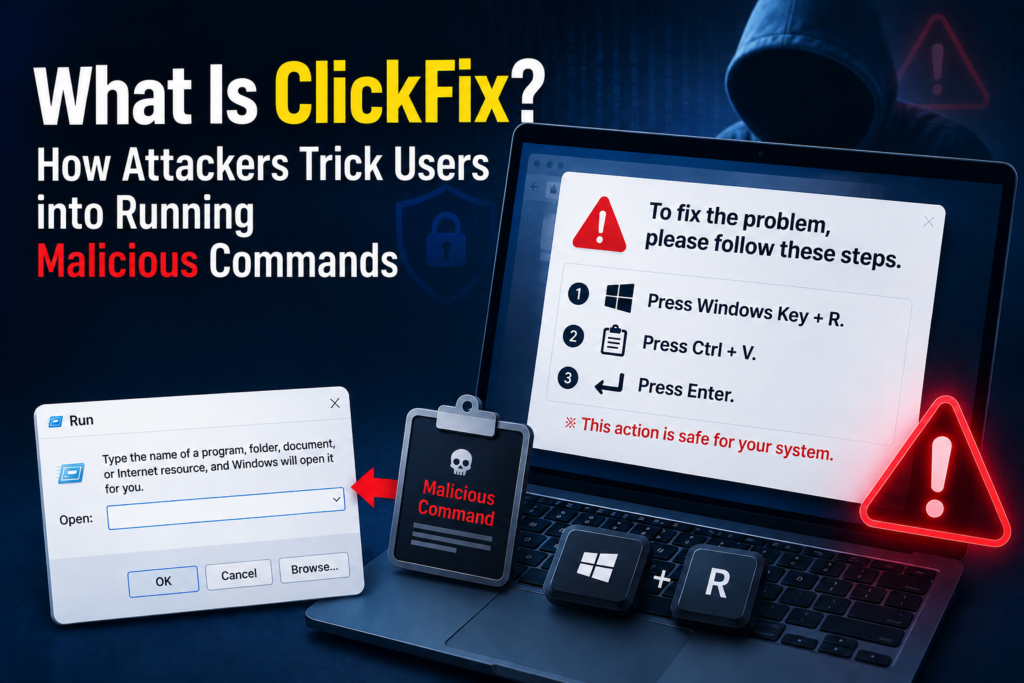
This type of social engineering attack that displays a fake error message or fake CAPTCHA and tricks users into executing commands themselves is known as ClickFix.
ClickFix is not the name of a specific type of malware. It is closer to an initial access method and attack procedure used to infiltrate a computer with malware.
Microsoft describes ClickFix as a social engineering technique that tricks users into initiating the infection process themselves and has analyzed how fake error messages, CAPTCHA prompts, and urgent security warnings can be used as lures.
What Is ClickFix?
The name ClickFix may sound as though it means “click to fix a problem,” but in reality, it is an attack method that causes users to execute system commands themselves.
Conventional phishing attacks often trick users into opening malicious attachments or downloading malicious programs. ClickFix, by contrast, instructs users to open operating system features such as:
- Windows Run dialog
- PowerShell
- Command Prompt
- Windows Terminal
- macOS Terminal
Attackers make users believe that they are following a legitimate troubleshooting procedure and then instruct them to paste and execute a command prepared by the attacker.
Therefore, the core of ClickFix is not simply getting someone to click a malicious link.
Its defining feature is instructing users how to execute a system command and making them run that command under their own user privileges.
Why Did ClickFix Emerge?
As the security features of operating systems and browsers have become stronger, it has become more difficult for websites to execute programs freely on a user’s computer.
Email services and security solutions also detect and block executable files and malicious attachments. Browsers may likewise display warnings when users attempt to download dangerous files.
Attackers therefore began using a different method to bypass these technical defenses.
Instead of making the computer execute a malicious command automatically, they instruct the user to execute it directly.
From the operating system’s perspective, the user has opened a legitimate feature and executed a command through their own account. As a result, parts of the attack process may appear to be normal user activity.
Rather than exploiting a weakness in a security system, ClickFix exploits human tendencies such as:
- The desire to resolve an error quickly
- The belief that a CAPTCHA must be completed
- Trust in familiar brands and interfaces
- The habit of following instructions in the order presented
- Anxiety that an ongoing task may be interrupted
In other words, ClickFix is both a technical attack and a social engineering technique that targets human judgment.
Where Do ClickFix Attacks Begin?
A ClickFix screen does not necessarily appear only on a website that was malicious from the beginning.
Attackers can use various routes to direct users to a ClickFix page.
1. Phishing Emails
Attackers place links in emails disguised as work messages, reservation confirmations, shared documents, payment notices, or account security alerts.
When the user clicks the link, they are redirected to a fake login screen or fake CAPTCHA page.
Microsoft analyzed a phishing campaign that impersonated Booking.com and used ClickFix to distribute information-stealing malware to hotel and hospitality workers.
2. Malicious Advertisements
Search results or website advertisements may redirect users to fake software download pages or fake troubleshooting pages.
Users may visit these pages because they believe the search result or advertisement is legitimate.
3. Compromised Legitimate Websites
Attackers may insert malicious scripts into vulnerable websites.
In this case, users may encounter a fake CAPTCHA or error screen even though they have visited a legitimate website that they already know.
Google Threat Intelligence Group analyzed a ClickFix campaign in which fake CAPTCHAs were displayed on compromised legitimate websites and users were instructed to execute a downloader script.
4. Fake Software Installation Pages
Attackers may claim that users need to install or update a browser, document viewer, video conferencing program, security application, or other software.
In reality, instead of installing a legitimate program, the user is made to execute a malicious command.
How Does ClickFix Work?
The specific method used in a ClickFix attack varies, but it generally follows this sequence.
Step 1. Create a Fake Situation
When a user visits a particular webpage, an error message or CAPTCHA screen appears.
Examples may include:
- The browser cannot display the page.
- An error occurred while loading the document.
- You must verify that you are human.
- Your security verification has expired.
- You must update your browser to play the video.
- Additional verification is required to open the cloud document.
The screen may be designed to resemble a legitimate service, and attackers may misuse the names or visual designs of familiar brands such as Microsoft, Google, or Cloudflare.
Step 2. Copy a Malicious Command to the Clipboard
When the user clicks a button labeled “Confirm,” “Copy,” or “Verify,” the webpage may copy a particular string of text to the clipboard.
The user may believe that an ordinary verification code or confirmation phrase has been copied.
In reality, the clipboard may contain a command that launches PowerShell or another system tool.
The user then proceeds to the next step without checking what was actually copied.
For this reason, ClickFix is also described as an attack that uses clipboard hijacking or clipboard manipulation.
Step 3. Instruct the User to Open a System Tool
The attack screen instructs the user to open an operating system tool directly.
On Windows, the user is commonly instructed to:
- Press the Windows key and R.
- Paste the clipboard contents into the Run dialog.
- Press Enter.
Depending on the attack, users may also be instructed to open PowerShell or Command Prompt directly.
On macOS, users may be instructed to open Terminal and paste a command. Although ClickFix has been widely observed on Windows, the concept is not limited to Windows. Microsoft has also reported ClickFix-style attacks targeting macOS users by instructing them to copy and execute Terminal commands.
Step 4. The Command Retrieves a Malicious File or Script
When the user executes the command, the computer may connect to an external server and download additional files or run a script.
The initial command may be relatively short. However, it can serve as a means of retrieving the next-stage program.
For example, the following actions may occur:
- Connect to an external server
- Download a malicious script
- Extract an archive
- Execute a malicious program
- Configure the program to run after the computer restarts
- Communicate with the attacker’s server
- Install additional malware
In this way, the initial command may act as a downloader or loader that starts the actual attack.
Step 5. The Final Malware Is Executed
ClickFix is not a method that installs only one specific type of malware.
Different types of malware may be installed depending on which program the attacker connects to the attack chain.
- Information-stealing malware
- Remote access malware
- Backdoors
- Ransomware
- Cryptocurrency wallet stealers
- Loaders used to install additional malware
Microsoft has analyzed cases in which ClickFix attacks using fake CAPTCHAs distributed information-stealing malware such as Lumma.
Why Is PowerShell Frequently Used?
PowerShell is an administration and automation tool included with Windows.
System administrators can use PowerShell to manage files, run programs, inspect network settings, and automate the management of multiple computers.
The problem is that attackers can also misuse these powerful capabilities.
Attackers may use PowerShell to attempt actions such as:
- Downloading files from an external server
- Executing scripts
- Hiding command contents
- Checking security settings
- Collecting system information
- Launching additional programs
PowerShell itself is not a malicious program. It is a legitimate Windows administration tool.
However, attackers can conduct attacks by misusing tools that are already built into the operating system.
Why Are Legitimate System Tools Used in Attacks?
The misuse of legitimate tools such as PowerShell, mshta, and rundll32 by attackers is commonly described as Living off the Land.
This refers to using legitimate programs that are already installed on a computer for an attack instead of running a newly introduced hacking program from the beginning.
The legitimate executable files used in this manner are sometimes called LOLBins, meaning Living Off the Land Binaries.
The following tools may be misused in ClickFix attacks:
- PowerShell
- cmd.exe
- mshta.exe
- rundll32.exe
- Windows Script Host
- curl
- certutil
All of these tools have legitimate administrative or execution functions.
Therefore, it is difficult to distinguish legitimate activity from malicious activity simply by looking at the program name. What matters is which command the tool executed and for what purpose.
Microsoft has explained that ClickFix attacks may combine clipboard manipulation with the misuse of legitimate system tools such as PowerShell, mshta, and rundll32.
How Is ClickFix Different from Conventional Phishing?
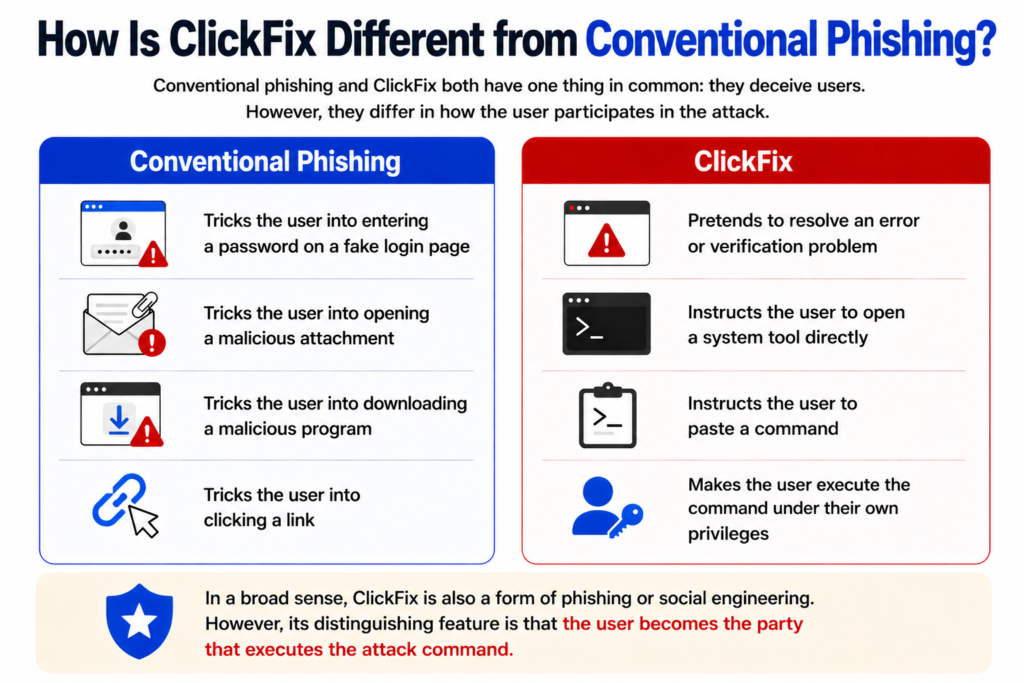
Conventional phishing and ClickFix both have one thing in common: they deceive users.
However, they differ in how the user participates in the attack.
Conventional Phishing
- Tricks the user into entering a password on a fake login page
- Tricks the user into opening a malicious attachment
- Tricks the user into downloading a malicious program
- Tricks the user into clicking a link
ClickFix
- Pretends to resolve an error or verification problem
- Instructs the user to open a system tool directly
- Instructs the user to paste a command
- Makes the user execute the command under their own privileges
In a broad sense, ClickFix is also a form of phishing or social engineering. However, its distinguishing feature is that the user becomes the party that executes the attack command.
Why Is ClickFix Dangerous?
1. The User Executes the Command Directly
The website does not break through the browser’s security features and automatically execute a program.
Instead, the user opens the Run dialog or Terminal and executes the command directly.
As a result, some security controls may interpret the activity as normal user behavior.
2. It Uses Legitimate Operating System Features
PowerShell and the Run dialog are legitimate Windows features.
Therefore, the mere fact that one of these programs was executed is not enough to determine whether an attack occurred.
Security systems must analyze the executed command, external communications, and the files and processes created afterward.
3. The User May Not Download a Malicious File Directly
The user may not realize that they are being attacked because they did not visibly download an executable file.
A single short command can download and run additional programs in the background.
4. It Imitates Familiar Screens
Attackers imitate screens that people frequently encounter, such as CAPTCHAs, browser errors, document-sharing interfaces, and software update notifications.
When the design appears natural, users are more likely to believe that the procedure is legitimate.
5. The Form of the Attack Can Be Changed Easily
ClickFix does not depend on a particular program or a single vulnerability.
Attackers can continuously change the wording on the screen, the impersonated brand, the execution tool, and the final malware.
Therefore, memorizing and blocking one specific screen is not enough.
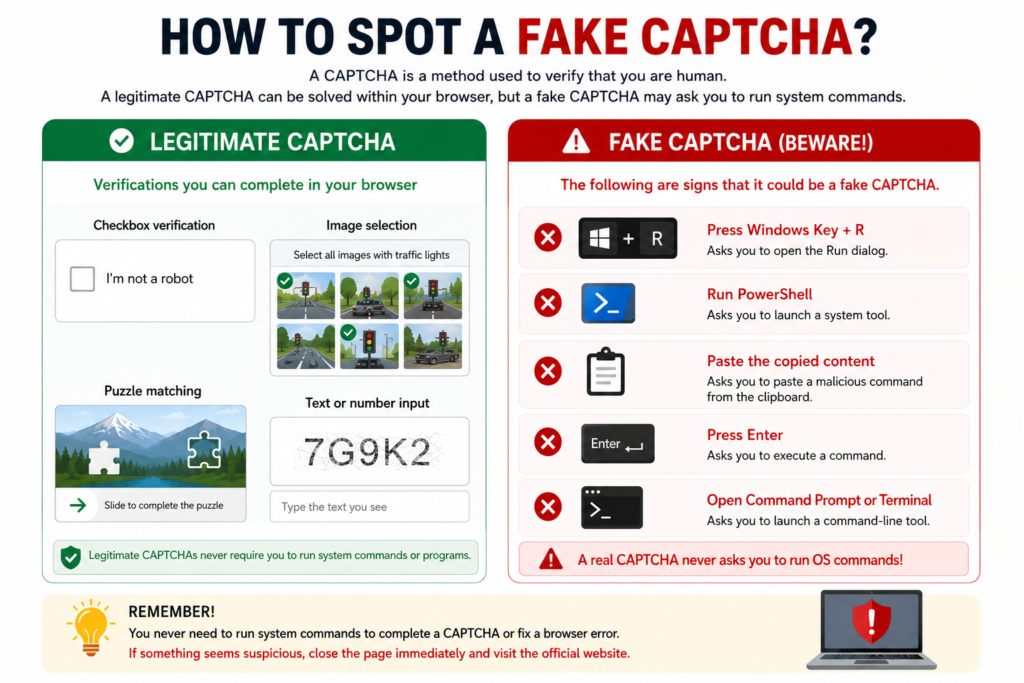
How Can You Identify a Fake CAPTCHA?
A CAPTCHA is a verification process used to distinguish automated bots from real users.
A legitimate CAPTCHA generally asks users to perform actions such as:
- Selecting a checkbox
- Choosing images
- Solving a puzzle
- Entering letters or numbers
- Completing verification within the browser
By contrast, the following requests should raise suspicion that the CAPTCHA may be fake:
- Telling you to press the Windows key and R
- Telling you to open PowerShell
- Telling you to launch Command Prompt
- Telling you to open Terminal
- Telling you to paste a copied command
- Claiming that a system command is required for security verification
A legitimate CAPTCHA does not require you to enter a command into the operating system’s Run dialog or Terminal.
What Damage Can Result from a ClickFix Infection?
Because ClickFix serves as the entry point for an attack, the resulting damage depends on the malware that is ultimately installed.
1. Account Credential Theft
Usernames and passwords stored in the browser may be stolen.
Accounts for email, social media, online shopping, and corporate business systems may fall into the attacker’s hands.
2. Login Session Theft
If browser cookies and session information are stolen, attackers may misuse an authenticated session without directly obtaining the password.
Even when multi-factor authentication is enabled, stealing an already established login session may allow account access.
3. Financial Information and Cryptocurrency Theft
Stored payment information, cryptocurrency wallet files, and wallet extension data may be targeted.
4. Remote Control
If remote access malware is installed, the attacker may be able to view the computer screen, execute commands, and steal files.
5. Infiltration of a Corporate Network
If a work computer is infected, attackers may steal corporate accounts, VPN information, cloud credentials, and internal documents.
A single infected computer may also become the starting point for infiltration into a company’s internal network.
6. Ransomware Infection
After gaining initial access, an attacker may install additional malware and eventually launch a ransomware attack.
How to Prevent ClickFix Attacks
1. Do Not Follow Website Instructions to Execute System Commands
Stop immediately if a website asks you to do any of the following:
- Press Windows + R.
- Run PowerShell.
- Open Command Prompt.
- Enter a command in Terminal.
- Paste copied content into the Run dialog.
There is no legitimate reason for normal web authentication or a CAPTCHA to require these actions.
2. Do Not Paste Clipboard Contents Without Checking Them
If you click a copy button on a webpage, you should check what was copied.
In particular, never paste content from an unknown source into the Run dialog, PowerShell, Command Prompt, or Terminal.
3. Verify Troubleshooting Instructions Through Official Support Pages
If an actual error occurs in a browser or program, check the software’s official website or official support documentation instead of blindly following instructions displayed in a pop-up.
4. Keep Your Browser and Operating System Up to Date
ClickFix is an attack that deceives people, but the attack page may be delivered through a compromised website or malicious advertisement.
Keeping your browser, operating system, and security software up to date can help block related threats.
5. Apply Multi-Factor Authentication to Work Accounts
Even if a password is exposed through ClickFix, multi-factor authentication can reduce the risk of account takeover.
However, because the browser session itself may be stolen, multi-factor authentication alone cannot block every attack.
6. Organizations Should Also Monitor Command Execution Activity
In corporate environments, organizations should not only detect malicious files but also examine activities such as:
- PowerShell being launched immediately after a browser
- PowerShell connecting to an external server
- A suspicious command being executed through the Run dialog
- mshta or rundll32 retrieving external content
- A new executable file being created in a user directory
- Abnormal access to browser credential files
Because ClickFix misuses legitimate system tools, it is important to examine the relationships between processes and the overall execution flow, rather than focusing only on filenames.
What Should You Do If You Have Already Executed a Command?
If you have executed a command that you suspect may be associated with ClickFix, simply closing the command window may not be enough.
Additional malware may already have been downloaded or executed.
Individual Users
- Disconnect from the internet.
- Stop any work or financial activity currently in progress.
- Run a full scan using a trusted security program.
- Change the passwords for important accounts from another safe device.
- Check the login history of your email and financial accounts.
- Revoke unknown login sessions and connected devices.
- If necessary, consider resetting the operating system or obtaining a professional inspection.
Company Computers
- Disconnect the computer from the network immediately.
- Notify the company’s security or IT team.
- Do not delete files or records on your own.
- Report when the command was executed and which website was visited.
- Report which company accounts were used and which systems were accessed.
In a corporate environment, deleting evidence without authorization may make it more difficult to analyze the incident and determine the extent of the damage.
Is ClickFix Malware?
It is not accurate to regard ClickFix itself as a type of malware.
ClickFix is an attack technique or initial access method that tricks users into executing malicious commands.
The malware installed through ClickFix may differ from one attack to another.
The distinction can therefore be summarized as follows:
- ClickFix: A method that tricks users into executing commands themselves
- Downloader or loader: A program that retrieves additional malware
- Information-stealing malware: A program that steals passwords, cookies, financial information, and other data
- Backdoor or remote access malware: A program that allows attackers to control an infected computer
- Ransomware: A program that encrypts files and demands payment
ClickFix is used to initiate the first stage of infection among these components.
DANA NOTES Commentary
The core of ClickFix is not a new hacking program, but a change in the user’s role within the attack process.
In conventional attacks, the attacker attempted to execute malware secretly. In ClickFix attacks, the user follows the attacker’s instructions and executes it directly.
Instead of technically disabling the operating system’s security features, the attacker persuades the user to cross those security boundaries voluntarily.
For this reason, it is not enough to understand ClickFix simply as a “fake CAPTCHA attack.”
A fake CAPTCHA is only one of several interfaces used to deceive users. The essential process is as follows:
- Make the attack look like a legitimate troubleshooting procedure.
- Deliver a malicious command by hiding it in the clipboard.
- Make the user directly execute a legitimate system tool.
- Use the user’s privileges to begin the malware infection.
The most important rule for preventing ClickFix is therefore simple.
A website does not need to execute a command on your computer to verify that you are human.
If a webpage asks you to open the Run dialog, PowerShell, Command Prompt, or Terminal, you should first suspect that it may be an attack rather than a legitimate troubleshooting procedure.
Summary
ClickFix is a social engineering attack technique that uses fake error messages or CAPTCHA prompts to trick users into executing malicious commands themselves.
Attackers copy a command to the clipboard and instruct users to paste it into the Windows Run dialog, PowerShell, macOS Terminal, or another system tool.
The command may then download malware from an external server or execute additional scripts, potentially resulting in information theft, remote access, corporate network infiltration, or ransomware infection.
ClickFix does not target technical vulnerabilities alone. It targets the behavior of people who trust legitimate-looking instructions and follow them as directed.
Therefore, if a CAPTCHA or troubleshooting process asks you to execute a system command, the safest response is to ignore the instructions and close the page immediately.