What This Article Covers
What Is an Agent?
In IT, an Agent is a program that performs predefined tasks on behalf of a person.
The word agent literally means “representative” or “someone who acts on behalf of another.” In IT, the meaning is similar. An agent carries out designated tasks according to predefined procedures, reducing the need for people to perform repetitive work manually.
However, an agent does much more than simply execute a program.
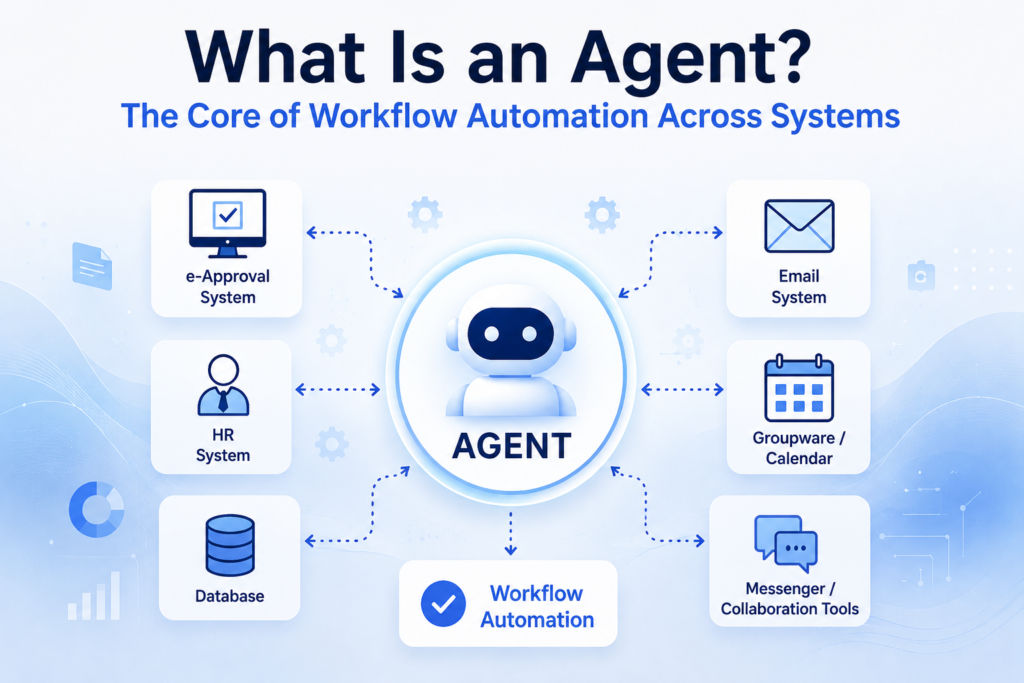
In enterprise environments, a single business process often requires multiple systems to work together. Approval systems, HR systems, ERP platforms, databases, email systems, and messaging tools each serve a different purpose and operate independently.
An agent connects these independent systems and automatically executes a single business workflow.
In other words, an agent acts as a coordinator that links multiple systems, executes tasks in the correct order, and keeps the workflow moving from one step to the next.
Why Do IT Systems Need Agents?
In most organizations, a single system cannot handle an entire business process on its own.
For example, when an employee submits a vacation request, the approval system manages the approval process, the HR system records the leave schedule, and the groupware calendar updates the team’s schedule. Meanwhile, the email system or messaging platform notifies the employee and other team members.
Each system performs only its own role. It does not carry out the responsibilities of the others.
Without an agent, someone would have to check the approval result, update the HR system, modify the calendar, and send notifications manually.
An agent connects these steps automatically, eliminating repetitive manual work.
In short, an agent’s primary role is to connect multiple systems and execute business processes in the correct sequence.
How Does an Agent Work?
An agent typically operates according to a predefined workflow.
For example, imagine that an employee submits a vacation request.
- Check the approval status in the approval system.
- Send the approval result to the employee by email.
- Register the leave schedule in the HR system.
- Update the groupware calendar automatically.
- Notify team members through email or a messaging platform.
This process involves multiple independent systems, including the approval system, email system, HR system, groupware, and messaging platform.
Each system performs only its own role and does not directly handle the work of the others.
The agent connects these systems, executes each task in the proper order, and passes the necessary information to the next system until the entire workflow is complete.
In other words, an agent’s core role is to connect multiple independent systems into a single automated workflow.
How Are Agents Used in IT Systems?
Agents are widely used to automate a variety of business operations.
① Monitoring Workflow
Monitoring systems continuously check the health of servers, networks, and applications.
When an issue is detected, the agent follows a predefined workflow. It may verify the service status, attempt an automatic recovery, and, if the issue cannot be resolved, immediately notify the appropriate administrator through email or a messaging platform.
The workflow looks like this:
Issue Detected → Automatic Recovery Attempt → Notify the Administrator if Recovery Fails
② Security Workflow
When a security system detects malware or suspicious activity, the agent executes predefined response procedures.
For example, it can restrict network access for a potentially compromised device, store the relevant logs, and immediately notify the security team.
The workflow looks like this:
Security Threat Detected → Initial Response → Log Collection → Notify the Administrator
③ Backup Workflow
Backup agents operate automatically according to a predefined schedule.
For example, if a database backup is scheduled for 2:00 a.m. every day, the agent automatically starts the backup at the designated time and records the results.
If the backup fails, it immediately notifies the administrator so the issue can be addressed as quickly as possible.
The workflow looks like this:
Scheduled Time → Backup Execution → Result Logging → Notify the Administrator if the Backup Fails
How Is an AI Agent Different?
In recent years, the term AI Agent has become increasingly common.
Both traditional agents and AI agents connect multiple platforms and tools to perform business tasks.
The biggest difference is how the workflow is determined.
A traditional agent follows a predefined workflow exactly as it was designed. Every step—including what task to perform first, which tools to connect, and in what order to execute the process—must be planned in advance by a person.
An AI agent, on the other hand, receives a goal, plans the necessary tasks, adjusts the workflow as conditions change, and selects the appropriate tools or functions to complete the job.
For example, if you simply say, “Summarize last week’s sales performance, create a report, and send it to the team manager,” an AI agent can retrieve the necessary data, generate the report, and then deliver it through email or a collaboration platform.
Of course, AI agents cannot handle every task on their own.
To perform business tasks, an AI agent must have access to the necessary tools and platforms. In addition, the underlying data must be organized in a way that the AI can understand.
For example, if a database contains only codes such as A01, Y, and 003 without any documentation explaining what they represent, the AI cannot accurately determine their meaning.
Likewise, if the AI does not have permission to access a required platform or if the necessary functionality is unavailable, it cannot complete the task.
In short, AI agents are more flexible than traditional agents, but they still rely on well-designed environments and properly organized data to operate effectively.
DANA NOTES
Agents are not a new concept introduced in the AI era. Today’s AI agents evolved from technologies that organizations have long used to automate business processes.
Traditional agents focus on executing predefined procedures exactly as designed, while AI agents can plan workflows based on a given objective and adapt their actions to the situation. This is the most significant difference between the two.
However, an AI agent’s decision-making ability depends on the environment in which it operates. It still requires access to the necessary tools and platforms, and the underlying data must be organized in a way that the AI can interpret correctly.
Ultimately, the easiest way to understand an AI agent is to think of it as a traditional agent enhanced with AI-driven decision-making capabilities, rather than a technology that completely replaces traditional agents.