
What This Article Covers
When an online service begins operating, a relatively small number of users typically access it at first.
When a user searches or opens a post, the client sends a request to the server, and the server performs the necessary processing and returns the result.
As the service becomes more widely known and the number of users increases, the same types of requests begin arriving more frequently.
Requests that once arrived 100 times per hour may increase to 1,000 or 10,000, and many users may also access the service at the same time during certain periods.
As the amount of requests and data that must be processed increases, the infrastructure also needs to grow into a structure capable of handling more work.
This is where the concepts of Traffic, Scaling, and Distribution come in.
Key Terms to Know
- Traffic: The amount of requests and data moving through a network
- Load: The amount of work a server or system must process
- Scaling: Increasing the processing capacity of infrastructure so that it can handle a growing workload
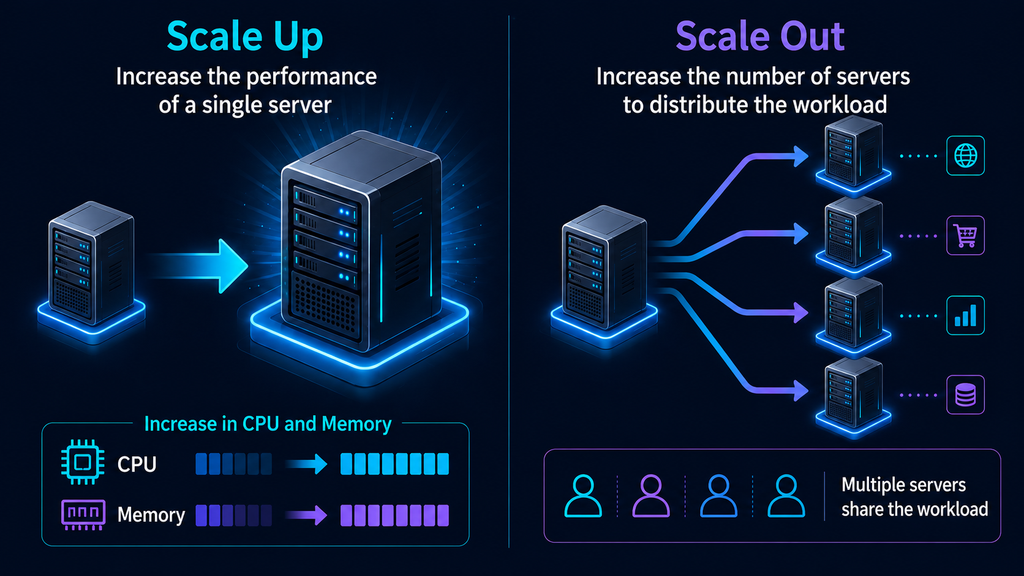
- Scale Up: Increasing the performance of a single server by upgrading resources such as CPU and memory
- Scale Out: Increasing the number of servers so that multiple servers can divide and process the workload
- Load Balancing: Distributing incoming requests across multiple servers
- Distribution: A structure in which multiple devices or systems divide and process work and roles
As the Number of Users Grows, the Server Has More Work to Process
Consider an online shopping mall.
When a user searches for a product, the server finds product information that matches the search conditions and sends the results.
When the user opens a product detail page, the server retrieves information such as the product name, price, inventory, and images. Logging in, adding a product to the cart, and placing an order each generate additional requests.
Even one user generates multiple requests while using a service.
When 100 users use the service at the same time, the server must process requests from multiple users together. When the number of users grows to 10,000, the amount of work that must be processed also increases significantly.
At this point, the CPU performs calculations for more requests, and memory stores the data needed for more tasks. The amount of data moving through the network also increases, while storage devices read and write more data.
The usage of the computing, connectivity, and storage infrastructure discussed earlier increases together.
Traffic Shows the Flow Entering a Service
One of the terms frequently used when operating a service is Traffic.
Traffic basically refers to the amount of requests and data moving through a network.
When a user opens a web page or clicks a search button, a request is sent to the server. When the server sends an image or search results, data moves back to the user.
As the number of users increases, this flow also grows.
When operating a service, the following situations can be examined alongside increases in traffic.
- An increase in website visitors
- An increase in the number of users accessing the service at the same time
- An increase in video or image data transfers
- An increase in requests such as searches, orders, and payments
Here, the total number of users and the number of users accessing the service at the same time can affect infrastructure differently.
Even if 100,000 people visit during a day, the number of requests the server needs to process at one time can be relatively small when access is spread across different times.
When many users access the service at the same time, as with concert ticket sales or limited-product sales, a large number of requests must be processed within a short period.
Companies examine service traffic to understand how many requests the current infrastructure is processing and to prepare the processing capacity that is needed.
As the Workload Grows, Infrastructure Processing Capacity Is Increased
A server has a certain amount of work it can process at one time.
When there are few users, a service can be operated with a single server. As requests increase, CPU and memory usage rises, and the amount of work waiting to be processed begins to grow.
Increasing the processing capacity of infrastructure in this situation is called Scaling.
Scaling can broadly be considered in two directions.
- Increasing the performance of the current server
- Increasing the number of servers
These are called Scale Up and Scale Out, respectively.
Scale Up — Making One Server More Powerful
Scale Up is a method of increasing the performance of the server currently being used.
For example, CPU processing capacity can be increased or memory capacity can be expanded.
Suppose the existing server has the following configuration.
- 4-core CPU
- 16GB memory
As the amount of work to be processed increases, a higher-performance server can be used.
- 8-core CPU
- 32GB memory
As the resources available to a single server increase, it becomes capable of processing more work.
In the early stages of a service, this method is often used to secure the necessary processing capacity. This is because the server’s performance can be increased while maintaining the existing structure.
As the service continues to grow, the range of resources that can be used by a single server also needs to be considered.
At this point, the infrastructure can expand through scale out, where multiple servers process requests together.
Scale Out — Multiple Servers Divide the Work
Scale Out is a method of adding servers that perform the same role.
Imagine that one server initially handled all user requests.
As the number of users continues to increase, the infrastructure can be expanded to two, three, or four servers so that multiple servers divide the requests among themselves.
The structure can be represented simply as follows.
User Requests
↓
Server A / Server B / Server C
The structure has expanded from one server handling all requests to multiple servers processing them together.
For example, when many users access an online shopping mall, some user requests can be processed by Server A, while other requests are handled by Server B and Server C.
Adding servers also increases the total CPU and memory available to the system.
An important characteristic of scale out is that processing capacity can continue to expand by adding servers as the service grows.
Distributing Requests Across Multiple Servers
When multiple servers are available, incoming requests need to be distributed among them.
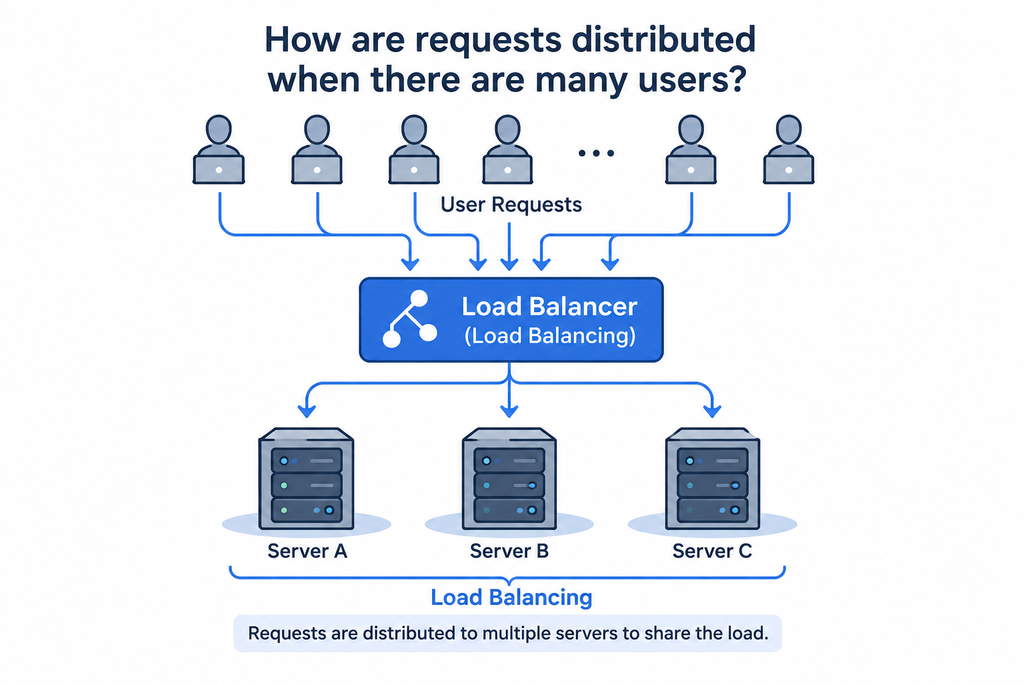
This process is called Load Balancing.
A system or device responsible for load balancing is called a Load Balancer.
The structure can be understood as follows.
Users
↓
Load Balancer
↓
Server A / Server B / Server C
User requests first arrive at the load balancer.
The load balancer distributes those requests across multiple servers. Server A processes some requests, while Server B and Server C each process other requests.
By dividing requests in this way, the processing capacity of multiple servers can be used together.
It also reduces situations in which requests become concentrated on a single server.
From the perspective of the Bottleneck concept discussed in #04, load balancing is one way to manage situations in which too much work becomes concentrated on a particular server and slows the overall flow of the service.
Distribution Is a Structure in Which Multiple Systems Divide the Work
As a service grows, work can be divided across multiple parts of the infrastructure as well as across servers.
This is broadly referred to as Distribution.
The easiest example to understand is a structure in which multiple servers divide and process user requests.
File delivery can also be divided across multiple systems.
For example, a service in which many users view photos or videos can deliver files from servers located in multiple regions rather than sending every file from one location.
A representative technology used for this purpose is a CDN (Content Delivery Network).
Users in Korea can receive files from servers in Korea or nearby regions, while users in the United States can receive files from servers closer to the United States.
As a service grows, distributed structures are used across multiple areas of infrastructure, including computing, connectivity, and storage, to divide the work that needs to be processed.
Scaling Also Requires Looking for New Bottlenecks
Adding multiple servers increases the number of requests that can be processed.
As the number of servers grows, the amount of work that other parts of the infrastructure need to process also increases.
For example, when the number of application servers increases to three, all three servers may send requests to the storage system to read data. As more data is delivered to users, network usage also increases.
This is where the bottlenecks and balance discussed in #04 connect again.
After increasing server processing capacity, it is also necessary to examine whether other infrastructure, such as storage, networks, and power, can handle the increased workload.
Because infrastructure operates a single service through multiple connected components, scaling is also carried out based on the overall flow.
In the Cloud, Resources Can Be Increased or Reduced as Needed
Cloud environments provide computing resources such as servers, storage space, and networks at the scale that is needed.
Companies can increase or decrease the number of servers while operating a service.
They can add servers during periods of increased traffic and reduce the number of servers when traffic declines.
A feature that can be configured to adjust this process automatically is called Auto Scaling.
For example, a service may normally operate with two servers and increase to four or six servers when many users access it. When traffic decreases again, the number of servers can also be reduced to match the required scale.
This approach is used to adjust the scale of infrastructure according to changes in the amount of work the service needs to process.
Service Growth Changes Both the Scale and Structure of Infrastructure
In a small service, a single server can perform many roles.
As the number of users grows and the server receives more requests to process, greater processing capacity becomes necessary.
Scale up can increase the performance of a single server, while scale out can expand processing capacity by adding multiple servers.
When multiple servers are used, a load balancer distributes requests among them, and as the service grows, distributed structures are also used across multiple areas of the infrastructure.
Throughout this process, computing, connectivity, storage, deployment and delivery, and the operating environment continue to work together.
Increasing the scale of digital infrastructure means increasing the necessary resources so that more user requests can be processed and creating a structure in which multiple devices and systems can divide the requests and workload.
DANA NOTES in One Line
As the number of users grows, infrastructure scales to handle more traffic, and as the service grows, distributed structures are used so that multiple servers and systems can divide and process requests and workloads.